Ask ChatGPT about your cases and leads — from your phone
ShamEye is the software for property and general-insurance appraisers. Connect it to ChatGPT once, then ask in plain language — ChatGPT answers from the system, exactly within what you're allowed to see.
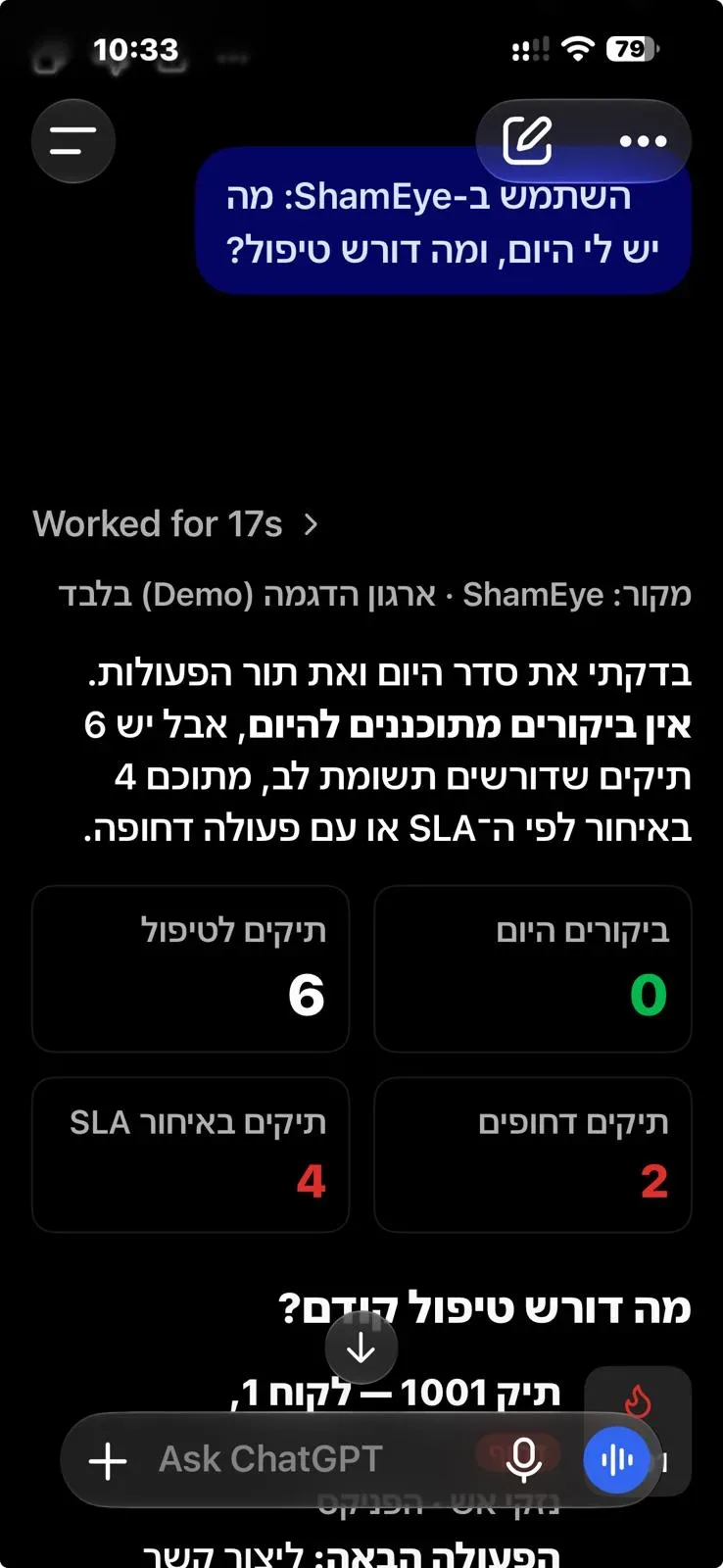
A working day with ChatGPT
ShamEye works in the background — and ChatGPT puts it in your pocket, whenever you're away from the desk.
- 01 · Before you head out
What do I have today, and what needs attention?
Today's visits, the urgent cases and what's overdue — before you've left the house.
- 02 · In the car, between visits
Which leads came in since this morning, and who should I call?
The leads from Google, Meta and your site, who hasn't been called yet, and the phone number — without opening the laptop.
- 03 · Before a call with the insurer
Where does the case on Herzl Street stand, and what's next?
The stage, what was sent and what's missing, and what the insurer answered — everything for the call, in seconds.
- 04 · At the end of the day
Which cases have been stuck too long?
What's stuck, for how long and at which stage — so tomorrow starts with the right thing.
What you can ask
ChatGPT reads the system and answers. The actions themselves — updating a case, sending a document — are done in the system.
Your day
- What do I have today, and what needs attention?
- Which cases have been stuck too long?
- What's on my schedule this week?
A specific case
- Where does the case on Herzl Street stand, and what's next?
- Which documents are missing in the case on HaGefen Street?
- What did the insurer answer in the Herzl Street customer's case?
Leads
- Which leads came in today?
- Who hasn't been called back yet?
- Where did this week's leads come from?
Help with the system
- How do I open a new case?
- How do I send an appointment letter for signature?
- What's the status of my support request?
Getting started
ShamEye customers connect ChatGPT from inside the system: Settings → Integrations → the ChatGPT card. It works with a free ChatGPT account too, on desktop and phone.
Not on ShamEye yet?
FAQ
Does it work with free ChatGPT?
Yes — on desktop and in the ChatGPT app on your phone.
Can ChatGPT change things in the system?
Not at the moment. It reads and answers; actions are done in the system.
Does everyone on the team need to connect?
Yes, each with their own account — and each sees only what they're allowed to see.
Can I use a different AI assistant?
ChatGPT for now. Other assistants are planned.
What does ChatGPT see of my data?
Only what you're allowed to see in the system. ID numbers, business and company numbers, signatures, email addresses and sign-in details are removed before anything is sent; the files themselves aren't sent; and a case view is recorded in that case's log. The office admin can turn ChatGPT off for the whole team.
The full terms: Terms of use · Privacy policy
Want to see it on your own office?
Start working the same day — and we're here for a short tour and any question.