Case management software for general-insurance, property and structural appraisers
The system is built around the case as it actually runs in insurance appraisal: appointment letter, visit, experts, policy, opinion, then indemnity and reinstatement. Not a general-purpose tool retrofitted after the fact.
The case, stage by stage
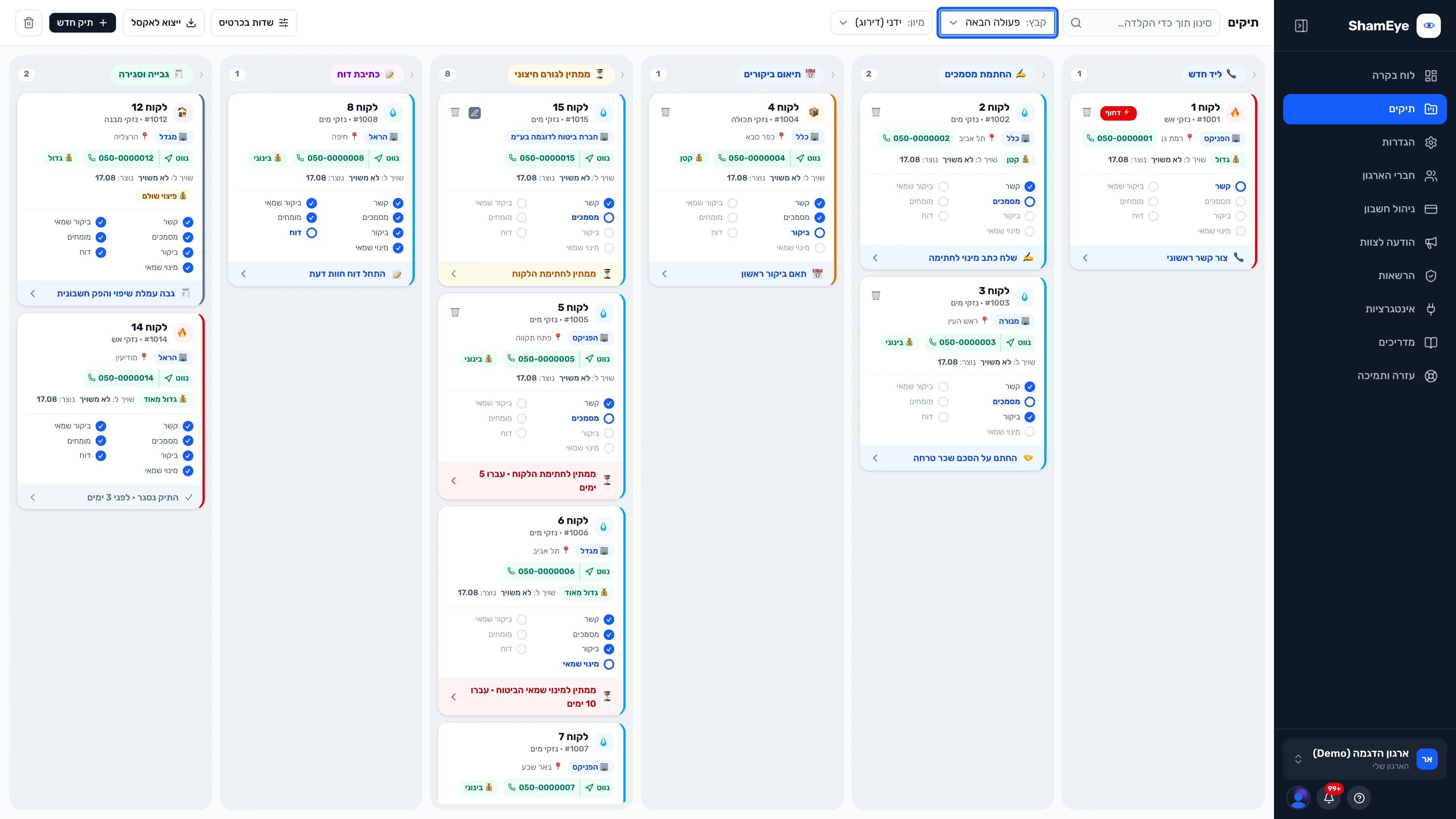
The ten stages the system carries — each one knows its next action, and what is blocking it.
- 01
Lead arrives
An enquiry from Google, Meta, your site's form or the phone — opens as a case with the details already filled in.
See it in the system - 02
First contact and visit scheduling
The intake call and the first visit are booked and logged on the case, with a reminder if nobody replies.
See it in the system - 03
Letter of appointment
Generated from the case in your firm's branding, sent for signature, and signed by the customer on their phone — no printer.
See it in the system - 04
Fee agreement
Goes out alongside the appointment letter and comes back signed, filed automatically.
See it in the system - 05
The insurer's appraiser is named
The insurance company's appraiser is recorded on the case, and the clock on their response starts running.
See it in the system - 06
The on-site inspection
The joint visit is documented from a phone — photos, findings and attendees, including the insurer's representative.
See it in the system - 07
Experts: leak detection and moisture testing
A plumber, structural engineer or moisture tester is engaged from the case, and their report comes back and is read automatically.
See it in the system - 08
Reading the policy
Insurer, policy number, cover period and sums insured are extracted from the policy — you approve before anything is saved.
See it in the system - 09
The opinion: draft, approve, send
The draft is written from the case data in your firm's branding. You edit, approve, sign — and send it to the insurer from inside the system.
See it in the system - 10
Indemnity, reinstatement and collection
Two closing cycles: record the indemnity and collect the commission, then — if the customer pursues it — the reinstatement receipts, the gap payment and the commission on it.
See it in the system
What real-estate appraisal software doesn't do
Four things that exist only in insurance appraisal — and therefore exist here.
Indemnity and reinstatement as two cycles
An insurance case doesn't close on a single payment. The system runs indemnity and reinstatement separately, including commission on the gap alone.
The moisture table from the expert's report
The table is extracted from the moisture report and lands in the opinion — without retyping it.
Policy reading
Insurer, policy number, period and sums insured are read from the document itself, across every insurer's form layout.
Expert coordination inside the case
Plumber, structural engineer and moisture tester are part of the case — engagement, visit, report and cost, in one place.
What has changed since the older packages
- The old wayInstalled on a machine at the office
- With ShamEyeIn the browser, from anywhere — no server, no installation
- The old wayWorks only from the desk
- With ShamEyeThe same system on mobile, in the field, at the customer
- The old wayEvery figure typed in from the document
- With ShamEyeAI reads the document, you approve
- The old wayInstallation, training and rollout
- With ShamEyeOpen an account and start working the same day
The old way
With ShamEye
Frequently asked questions
Does it suit property appraisers and structural appraisers too?
Yes. In Hebrew «שמאי אלמנטרי», «שמאי רכוש», «שמאי מבנה» and «שמאי ביטוח» all describe the same work — an insurance claim on property damage — including people who work across them. The system is built around exactly that case.
What about real-estate appraisal?
That is a different profession, with a different process and different documents. ShamEye doesn't claim to cover it — it was built for general-insurance appraisal and insurance claims.
We already use software. Can we switch mid-stream?
Yes. You can open your active cases in the system and carry on working, leaving closed cases where they are. A proper import path is in development.
What happens to our data?
The data is yours. You can export cases and documents to Excel at any time, and opinions are stored in your firm's branding.
Want to see it on a real case of yours?
Leave your details and we'll get back to you with a short tour and answers to any questions.